
Help centre › Getting started
Start a class and invite students
A class is a link. Make it once and use it for every lesson with that student or group.
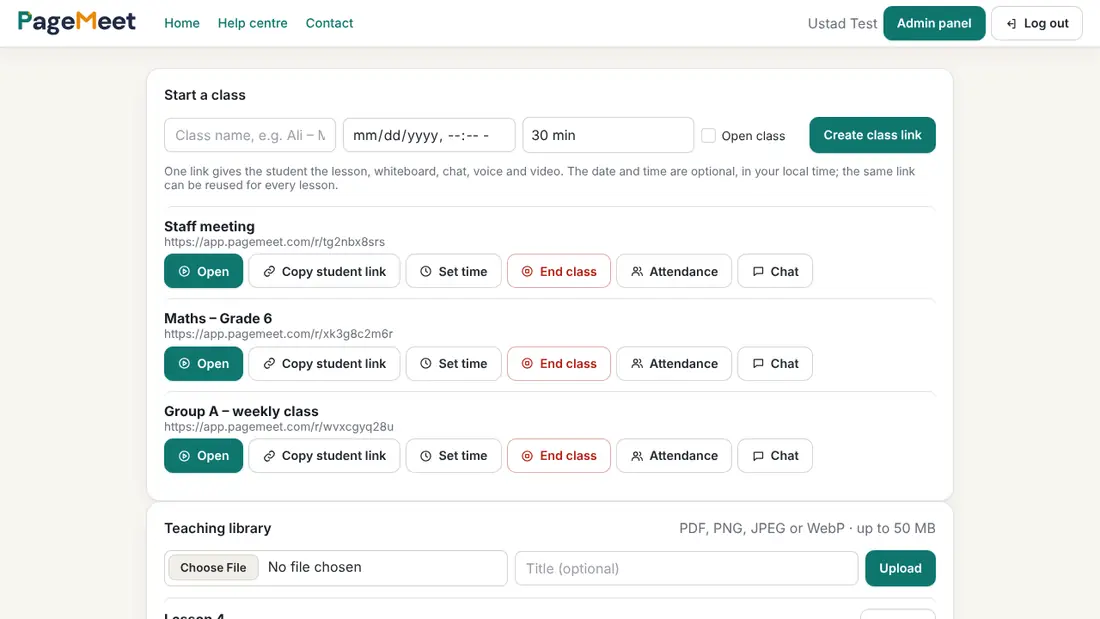
- On My classes, type a name for the class under Start a class.
- A date and time are optional. Add them if you want the time shown to the student and a calendar file.
- Press Create class link.
- Press Copy student link and send it to the student the way you normally reach them.
- Press Open to enter the class yourself.
Open class or normal class
A normal class can only be taught by you or a teacher your admin has assigned. Tick Open class when any person holding the link may act as the host, for example a meeting between colleagues.
Ending a class
Leaving the class does not close the link. Press End class on My classes when the link should stop working for good.
Was this not enough? Ask us and we will answer and improve this page.