
Help centre › Recording and supervision
Recordings
Lessons are recorded without anybody pressing a button.
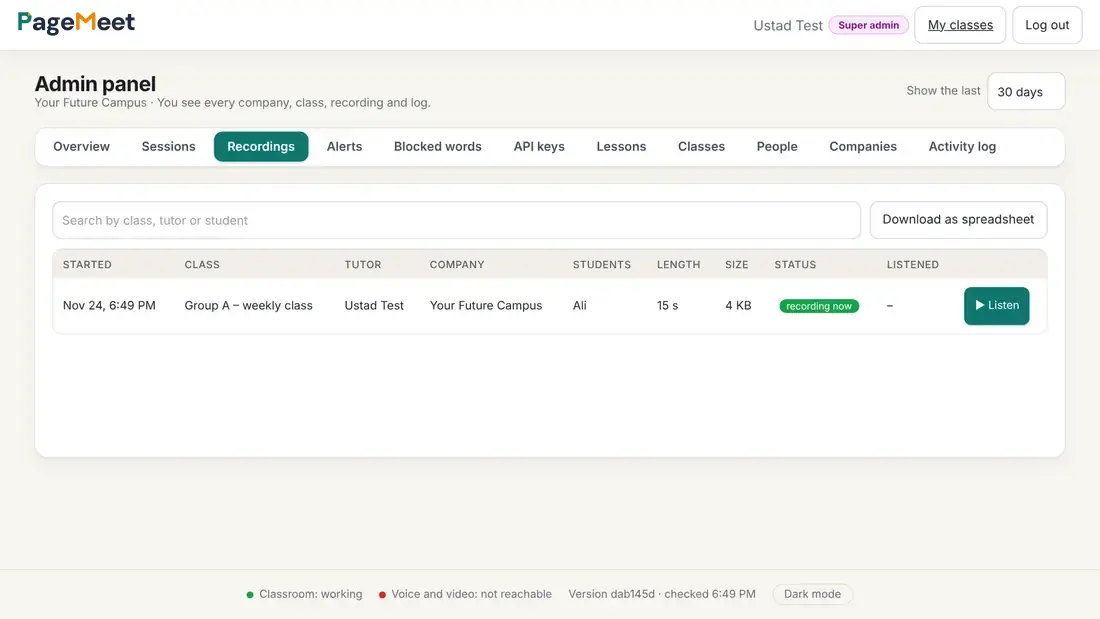
When recording happens
Recording starts by itself when a teacher and at least one student are both in the class, and stops when either leaves. Everyone in the class sees that it is recorded and supervised.
Playing a lesson back
- Open Admin panel (teachers see Reports and recordings), then Recordings.
- Choose the lesson and press play.
- Choose Both, Student only or Tutor only to hear one side.
The pages that were on screen are shown in step with the sound.
Who can listen
Teachers hear their own lessons. Supervisors hear the teachers assigned to them. Admins hear every lesson in the school.
Recordings, chat and logs cannot be deleted by teachers, supervisors or admins. That is what makes them usable as a record.
Was this not enough? Ask us and we will answer and improve this page.